Sometimes we need to do something many times. To avoid writing too much repetitive code, we need loops.
Sometimes the number of iterations is not a constant, so we cannot repeat the code multiple times and must use a loop.
for Statement
The structure of a for statement is as follows:
for (initialization; condition; update) {
  loop_body;
}
Execution order:
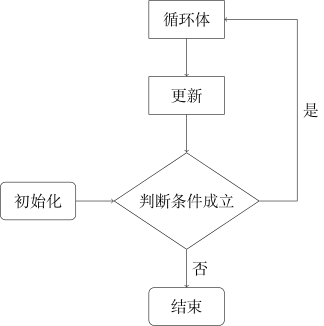
e.g. read in n numbers:
for (int i = 1; i <= n; ++i) {
  cin >> a[i];
}
Any of the three parts of a for statement can be omitted. If the condition is omitted, the condition is equivalent to always being true.
while Statement
The structure of a while statement is as follows:
while (condition) {
  loop_body;
}
Execution order:
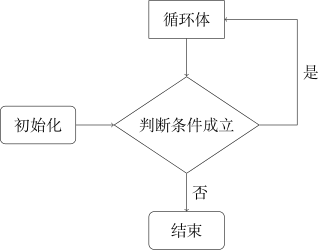
e.g. verify the 3x+1 conjecture:
while (x > 1) {
  if (x % 2 == 1) {
    x = 3 * x + 1;
  } else {
    x = x / 2;
  }
}
do...while Statement
The structure of a do...while statement is as follows:
do {
  loop_body;
} while (condition);
Execution order:
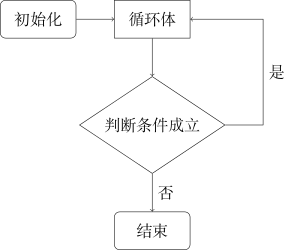
The difference from a while statement is that a do...while statement executes the loop body first and then checks the condition.
e.g. enumerate permutations:
do {
  // do someting...
} while (next_permutation(a + 1, a + n + 1));
Relationship Among the Three Statements
// for statement

for (statement1; statement2; statement3) {
  statement4;
}

// while statement

statement1;
while (statement2) {
  statement4;
  statement3;
}
They are equivalent when there is no continue statement (see below) in statement4, but the second method is rarely used.
// while statement

statement1;
while (statement2) {
  statement1;
}

// do...while statement

do {
  statement1;
} while (statement2);
These two methods are also equivalent when there is no continue statement in statement1.
while (1) {
  // do something...
}

for (;;) {
  // do something...
}
Both of these loop forever. (You can use break (see below) to exit.)
It can be seen that the three statements can replace one another, but generally, the following principles are used when selecting a statement:
- When there is a fixed increment step during the loop (most commonly enumeration), use a for statement;
- When only the loop termination condition is determined, use a while statement;
- When using a while statement, if the loop body should be executed before checking the condition, use a do...while statement. It is rarely used; a common use case is user input.
break and continue Statements
The break statement exits the loop.
The continue statement skips the rest of the loop body. The following uses a continue statement in a do...while statement as an example:
do {
  // do something...
  continue;  // equivalent to goto END;
// do something...
END:;
} while (statement);
Both break and continue statements can be used in the loop body of all three loop statements.
Generally, break and continue statements are used to make the logic of code clearer, for example:
// The logic is relatively unclear, and the brace nesting is complex

for (int i = 1; i <= n; ++i) {
  if (i != x) {
    for (int j = 1; j <= n; ++j) {
      if (j != x) {
        // do something...
      }
    }
  }
}

// The logic is clearer, and the brace nesting is simple and clear

for (int i = 1; i <= n; ++i) {
  if (i == x) continue;
  for (int j = 1; j <= n; ++j) {
    if (j == x) continue;
    // do something...
  }
}
// The condition of the for statement is complex and does not show the essence of "enumeration"

for (int i = l; i <= r && i % 10 != 0; ++i) {
  // do something...
}

// The for statement is used for enumeration, and break is used to indicate "when to stop"

for (int i = l; i <= r; ++i) {
  if (i % 10 == 0) break;
  // do something...
}
// Repeated statements, unnatural order

statement1;
while (statement3) {
  statement2;
  statement1;
}

// No repeated statements, natural order

while (1) {
  statement1;
  if (!statement3) break;
  statement2;
}